How to Check BVN on GTB in 2026: A Simple Guide
checking your BVN (Bank Verification Number) on GTBank (GTB) is a quick and straightforward process. The BVN is a unique 11-digit number issued to every bank account holder in Nigeria to help combat fraud and ensure a secure banking system. Whether you’ve forgotten your BVN or need to access it for an online transaction, you can easily retrieve it through different methods provided by GTB.
How to Check BVN via USSD Code
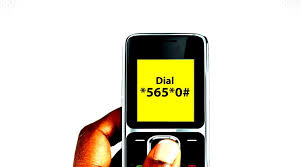
One of the easiest ways to check your BVN on GTBank is by using a USSD code. Here’s how:
- Dial 5650# from the mobile number linked to your GTB account.
- After dialing, your 11-digit BVN will appear on the screen.
- You will also receive a confirmation message containing your BVN.
Please note that a service charge of N20 may apply for each BVN inquiry.
How to Check BVN via GTBank Mobile App
You can also check your BVN using the GTBank mobile app if you prefer the convenience of online banking. Here’s a step-by-step guide:
- Download and install the GTWorld app from the Google Play Store or Apple App Store if you haven’t already.
- Log in to your account with your username and password or biometrics.
- Navigate to the Profile section.
- Your BVN will be displayed in your account details.
How to Check BVN via Internet Banking
For those who use GTBank’s internet banking platform, your BVN is also accessible online:
- Visit the official GTBank internet banking portal at ibank.gtbank.com.
- Log in with your credentials.
- Under your account information, you will find your BVN displayed.
Contacting GTBank Customer Care
If you encounter issues with retrieving your BVN through any of these methods, you can reach out to GTBank customer care for assistance by:
- Dialing 0700 4826 66328 (0700 GTBANK).
- Sending an email to gtconnect@gtbank.com.
Conclusion
Retrieving your BVN from GTBank is simple whether you use the USSD code, mobile app, or internet banking. Always keep your BVN handy for transactions and verification purposes, and ensure that the phone number linked to your bank account is active for easy access to this important number