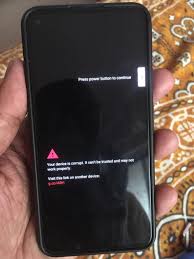
How to Resolve g.co/abh Problem on Google Pixel Phones
The g.co/abh issue is a common problem faced by Google Pixel users, where they encounter an unexpected security prompt or encounter difficulty with account recovery. This guide provides a detailed solution to help you resolve this problem on your Pixel phone.
Understanding the g.co/abh Problem
The g.co/abh message generally appears due to account or device verification requirements or issues with Google account settings. The notification could occur when attempting to access specific Google services or when performing account-related actions, often linked to security concerns.
Why Does the g.co/abh Problem Occur?
Several factors may trigger the g.co/abh issue on Google Pixel devices, including:
- Security Verification Requirements: Google prompts additional security checks if there’s suspicious activity or login attempts from unusual locations.
- Device or Account Recovery Settings: Incorrect settings or a lack of recovery options, like a recovery email or phone number, can cause this issue.
- Cached Data and App Issues: Accumulated cache files in Google services apps may result in this problem.
- Google Play Services Outdated Version: Outdated Google Play Services can create compatibility and verification issues on your device.
Steps to Resolve g.co/abh Issue on Pixel Phones
Step 1: Clear Cache for Google Play Services
- Open Settings on your Pixel phone.
- Tap on Apps and then locate Google Play Services.
- Tap Storage & Cache and then select Clear Cache.
Clearing the cache often resolves minor glitches in the app that may contribute to the problem.
Step 2: Update Google Play Services and Other Apps
- Open the Google Play Store.
- Search for Google Play Services and check for updates. Update if available.
- Also, ensure Google apps like Google, Chrome, and Gmail are up-to-date.
Running the latest versions can help avoid compatibility issues.
Step 3: Check Google Account Security Settings
- Go to myaccount.google.com/security on a browser or open Settings > Google > Manage your Google Account.
- Review the Security section and ensure:
- 2-Step Verification is enabled.
- Recovery options (backup email, phone number) are set up.
- Sign-in details are up-to-date.
These settings help in minimizing verification issues and keep your account secure.
Step 4: Restart Your Pixel in Safe Mode
Safe Mode can help identify if third-party apps are causing the issue.
- Hold the Power button until the power menu appears.
- Press and hold Power off until the option for Safe Mode appears. Tap OK to reboot into Safe Mode.
- In Safe Mode, check if the g.co/abh issue still persists.
If the issue disappears, uninstall recent apps as one may be causing the problem.
Step 5: Sign Out and Sign Back into Google Account
- Open Settings > Accounts and tap on Google.
- Select your account and tap Remove Account.
- Restart your phone, then go to Settings > Accounts and re-add your Google account.
Signing out and signing in again can refresh your account data and fix related errors.
Step 6: Factory Reset (If Necessary)
If none of the previous steps work, you may need to perform a factory reset:
- Back up important data first, as this will erase all information on your device.
- Go to Settings > System > Reset Options.
- Select Erase all data (factory reset) and confirm.
This is a last resort and should resolve persistent g.co/abh issues.
How to Avoid g.co/abh Issues in the Future
To prevent encountering this issue in the future, consider the following tips:
- Regularly Update Google Play Services and Apps: Keep all Google apps updated to avoid compatibility issues.
- Enable 2-Step Verification: Strengthens security and reduces Google’s need for additional verification prompts.
- Clear Cache Periodically: Regularly clear cache from Google apps to maintain optimal performance.
- Use a Recovery Email and Phone Number: Having both set up in your Google account provides extra account recovery options.
FAQs
Q: Will removing my Google account delete my data?
A: Removing your account will not delete data backed up to Google, but unsynced data may be lost.
Q: How often should I clear cache for Google apps?
A: Clearing the cache once every couple of months can help maintain app performance.
Q: Is it safe to perform a factory reset?
A: Yes, but back up your data first, as a factory reset erases all data on the device.
Conclusion
The g.co/abh issue can be a nuisance, but with the right steps, you can resolve it and avoid future complications. By following this guide, you can troubleshoot and fix the g.co/abh problem on your Pixel device, ensuring a smoother user experience. Stay vigilant with your account security settings and keep your Pixel updated to prevent similar issues